The Mirror Test: How to Improve ChatGPT Prompts and Boost AI for Business Productivity
Includes a FREE prompt framework template give away plus 12 ready to use business prompts … read on
Two years ago, I decided to see what all the AI fuss was about. As a Tottenham Hotspur fan (yes, I know, we never win anything), I thought I’d test ChatGPT with something I knew inside out to see if I could improve ChatGPT prompts enough to get useful, human-quality results.”
The result was superficial rubbish. Players named incorrectly. Events mis-dated. Not even a mention of the new stadium build, which any proper Spurs fan knows dominated our finances for years. I gave up, thinking this AI thing wasn’t all it was cracked up to be.
I wanted to fix bad AI outputs rather than blame the tool – and that’s when the real learning began.
Turns out the problem wasn’t the AI. It was me.
Getting poor outputs from ChatGPT? Before you blame the technology, look at what you’re actually asking it to do. The quality of your results has nothing to do with luck or AI magic. It’s about how clearly you’re communicating what you need.
That same principle applies to AI for business productivity — the clearer your team’s prompts, the more useful and time-saving your AI tools become.
Understanding that AI reflects your communication clarity back at you
This simple truth explains why ChatGPT gives bad results when prompts are vague.
Here’s the thing about AI: it doesn’t think the way we do. It processes the exact words you give it and tries to match patterns it’s learned from millions of examples. When I asked for that Tottenham blog post, I assumed it would know which players mattered, which events were significant, what context was crucial. It didn’t. How could it?
Think of it like giving directions to someone who’s never been to the Highlands. If you say “meet me at the shop,” they’ll be lost. But if you say “meet me at the Co-op on Grampian Way in Aviemore, the one on ‘Dalfaber’,” they’ll find you. AI works exactly the same way.
The AI processes what you give it, nothing more. Vague instructions get vague results. Detailed, specific instructions get focused, useful outputs. Every time you get a response that misses the mark, you’re looking at a mirror showing you exactly where your prompt lacked clarity.
My Tottenham disaster taught me this the hard way. I hadn’t told the AI:
- Which specific events or periods to focus on
- What level of football knowledge to assume in the reader
- Which aspects of the club’s history were most relevant
- What tone or style I wanted
- How long the piece should be
I’d basically said “write about this massive topic” and expected it to read my mind about what mattered. That’s not how this works.
The lesson: Your output quality is determined by your input quality. Always. We’ve learned this dozens of times over the past two years, usually after wasting time and money on rubbish results that were entirely our own fault.
How to read your AI outputs as feedback to improve ChatGPT prompts
When ChatGPT gives you something that’s not quite right, it’s actually telling you what was missing from your prompt. You just need to know how to read the signs and adjust your AI prompt engineering techniques.
Step 1: Check the length and depth
Got a surface-level answer when you needed detail? You didn’t specify how comprehensive you wanted the response. Got an essay when you needed bullet points? You didn’t define the format. My Tottenham blog post was superficial because I never told the AI I wanted deep analysis rather than a quick overview.
Step 2: Look at the tone
Does it sound too formal or too casual? You likely didn’t specify the voice. Does it read like a corporate press release when you wanted something conversational? The AI defaulted to its most common training pattern because you didn’t tell it otherwise. Every time we forget to set a tone, we get back that bland, generic AI voice that screams “this wasn’t written by a human.”
Step 3: Examine the structure
Is the information organised the way you need it? If not, you probably didn’t outline the structure you wanted. Did it skip important sections? You didn’t tell it what must be included. When I ran competitor analysis for a client early on, I got back data that technically answered my questions but was scattered across paragraphs with no cohesive structure. That was my fault for not specifying how I needed the information organised.
Step 4: Review the specificity
Are the examples generic? Is the advice too broad? That means your prompt was too general. The AI can only be as specific as you allow it to be. Those incorrect player names in my football blog? That happened because I didn’t specify which players or periods to focus on, so the AI guessed. Badly.
Every “wrong” output is actually a diagnostic report showing you exactly what your prompt was missing. Start treating your results as feedback, and you’ll quickly see patterns in what you need to improve.
Iteration is how you fix bad AI outputs and develop consistent performance.
Nobody writes the perfect prompt the first time. We certainly don’t, and we’ve been doing this for years. The difference between people who get great AI results and those who don’t isn’t natural talent. It’s willingness to iterate and learn from what went wrong.
Lesson 1: Start with what went wrong
Take your disappointing output and list what’s missing or incorrect. Too generic? Add specific examples to your next prompt. Wrong tone? Define the voice you need. Missing key information? List the must-include points.
After my Tottenham failure, I gave up on AI for months. Mistake. I should have asked: what context did I assume the AI would know but didn’t tell it? What specific aspects should I have highlighted? That analysis would have taught me more than any tutorial.
Lesson 2: Add constraints, not just requests
Instead of “write about customer service,” try “write 300 words about handling difficult customers in small Highland retail shops, using a friendly but professional tone, with three practical examples from tourism or hospitality businesses.”
See the difference? Constraints aren’t limitations. They are clarity.
But here’s what I learned through trial and error: you can’t just add random constraints and hope for the best. You need a systematic way to make sure you’re covering everything that matters. After months of getting inconsistent results, I started researching structured prompting methods that had emerged from the AI community. People who’d been experimenting with prompt engineering techniques had identified patterns in what makes prompts work consistently.
One evening, my wife gave me the perfect test case. She needed a crochet pattern for a rectangular cushion (almost, but not quite, two squares of an existing pattern she’d completed). She was sceptical about “the whole AI thing,” as she puts it, and I saw an opportunity to prove AI could be genuinely useful for something specific and practical.
We use the C.R.A.F.T. framework, a leading prompt engineering method.
I didn’t just say “write a crochet pattern.” Instead, I used a structured framework I’d come across called C.R.A.F.T. (Context, Role, Action, Format, and Target audience). It’s one of several prompt engineering frameworks that have evolved as best practice in the AI community, alongside others like CREATE, RACE, and GCSE. Nobody invented these methods as such, they emerged naturally as people figured out what information AI consistently needs to give useful outputs.
The C.R.A.F.T. approach breaks down the essential elements:
- Context: What’s the situation and goal?
- Role: What expertise should the AI draw from?
- Action: What specific steps should it take?
- Format: How should it present the information?
- Target audience: Who’s this for and what do they need?
For the crochet pattern, this meant I told the AI:
- The exact dimensions needed
- The stitch types from the original pattern
- The yarn weight she was using
- Her skill level
- How this related to the square she’d already made
- The specific format she needed (written pattern, not diagram)
We tested the output in Perplexity, Gemini, ChatGPT, and Claude. Gemini gave the best result (according to the expert crocheter). The pattern worked perfectly, and her response? “Okay, this could actually be useful. We could write patterns and put them on the market for testing!”
That’s when she stopped being sceptical.
C.R.A.F.T. isn’t the only structured method out there, and there’s no single “right” framework. What matters is having some systematic way to think through your prompts so you’re not forgetting crucial elements each time. I’ll break down exactly how I use C.R.A.F.T. for different business tasks in a follow-up article, but the key lesson here is this: once you adopt a repeatable structure for your prompts, your results become consistently better.
Lesson 3: By revising prompts this way, you improve AI content accuracy every time
When you get something wrong, don’t delete it and start over. Compare it against what you actually needed. What did you assume the AI would know but didn’t tell it? What context did you have in your head that never made it into the prompt? Understanding this will massively improve AI-generated content quality.
I once spent a week’s worth of tokens on image generation before realising I needed to tell the AI what setting or environment I wanted. For some reason, everything I generated came out as a ceramic tile. I still don’t really know why. But that frustration taught me: if the output looks wrong, I’ve probably left out something obvious.
Lesson 4: Build on what works
When you get a good result, save that prompt. Note what made it work. Was it the specific word count? The examples you provided? The structure you outlined? Those elements become building blocks for future prompts.
After the crochet success, I adapted that same C.R.A.F.T. structure for business tasks. Now when I’m doing competitor analysis or market research for clients, I use variations of the same framework. It works because it forces me to think through exactly what I need before I ask for it.
Think of prompting like learning to give better directions. The first time, you might say “it’s near the shops.” After someone gets lost, you learn to say “it’s the second street after the roundabout, blue door, number 47.” Each iteration makes you more precise.
Building a personal framework for consistent, high-quality AI interactions – and AI for business productivity
Clear frameworks don’t just improve creative prompts – they scale AI for business productivity by standardising how teams communicate with AI tools.
After you’ve iterated enough prompts and seen what works, it’s time to stop reinventing the wheel every time you need something from AI. Here’s what actually works, based on two years of making expensive mistakes so you don’t have to.
Create a prompt template library
When you nail a prompt that gets consistently good results, save it. Strip out the specific content but keep the structure.
The C.R.A.F.T. methodology I mentioned earlier isn’t just for one-off tasks. Once I understood how it worked, I adapted it into a reusable template for complex business tasks. Now I have a version for competitor analysis, another for market research, another for strategy documents, and another for content creation. Same structure, different details each time.
These reusable templates are how we embed AI for business productivity into day-to-day workflows, cutting repetitive effort and improving project accuracy.
Here’s the basic structure I use:
- Context: State the topic and goal. List scope, must-haves, and limits. Add key terms if needed. Share sources or examples. Set success metrics.
- Role: Define the expertise level and perspective the AI should take.
- Action: Break down the specific steps the AI should follow.
- Format: Specify exactly how you want the information structured.
- Target Audience: Describe who will read this and what they need.
That’s the overview, but the real power comes from knowing exactly what to fill in for each element. Getting this wrong means you’re back to vague AI prompt writing and disappointing outputs. Getting it right means you have a template you can use dozens of times with consistently good results.
Your Starting Point:
The Complete C.R.A.F.T. Template
(Plus 12 Ready-to-Use Business Prompts)
Rather than making you figure this out through months of trial and error like I did, I’ve put together something that’ll get you started properly from day one.
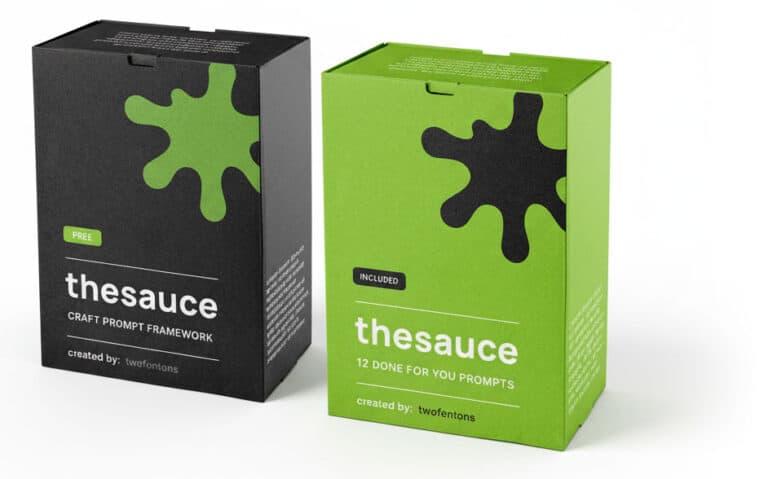
What you get:
The Complete C.R.A.F.T. Framework
- The full template structured with all five elements explained (plus a crib sheet for easy reference)
- Specific fill-in-the-blank sections so you know exactly what information to provide
- Quality checks to run before you submit your prompt
- Output requirements that guarantee usable results
12 Ready-to-Use Business Prompts
- Each one built using the C.R.A.F.T. methodology so you can see exactly how it works in practice
- Common business tasks you’re probably already doing (or paying someone else to do)
- Just copy, customise to your business, and use immediately
The framework takes a short time to properly adjust each time (don’t rush it), but the ready-made prompts work straight away. After you’ve used a few, you’ll start to see the patterns and be able to create your own.
Plus 12 ‘done for you’ Business Prompts
No charge. No tricks. Just thesauce that works.
A Document that works for different tasks
Keep a simple list of what specifications matter for different types of content. I work primarily in Projects (in Claude), Spaces (in Perplexity), and custom GPTs for specific roles. In effect, I choose the tool best for the job, which only comes with experience. I always consider whether the task I’m performing can be saved as a template so it can be used again for similar work, just with different project data.
For example, when doing competitor analysis, I learned the hard way that a simple prompt like “review [client URL], then [three competitor URLs] and write a gap analysis report” gives poor quality results. The data technically covers what I asked for, but it doesn’t give any insightful value that could move the needle for the client. I needed a more cohesive solution.
I liken it to going to the supermarket without a list but knowing you need 20 items. You’re lucky to remember 12 of them, as inevitably some items ‘drop out the bottom’. An LLM is exactly the same. Using Projects, Spaces, or custom GPTs allows me to collate resources and limit the AI’s focus to specific tasks whilst working within the right context for each.
These are my go-to AI prompt best practices before running any client task
Before hitting enter on any prompt, run through your essentials. Here’s what I always include now (after forgetting them repeatedly):
| Must Specify | Why It Matters |
| Language | Set to UK English or you’ll get American spelling. It’s “centre” not “center”, “theatre” not “theater”. My grammar preferences are account-wide now because I was fed up fixing this every time. |
| Tone & Voice | Give the AI your personality and tone. Most LLMs allow account-wide instructions. Set these and save yourself frustration. |
| Format | Specify structure or you’ll get whatever the AI defaults to. Paragraphs? Bullets? Tables? Say it explicitly. |
| Banned Phrases | Tell it to avoid those dead AI giveaways like “in the ever-evolving world of” or “emerges as a beacon” or excessive use of em dashes. Nothing screams AI content louder. |
| Word Count | Otherwise you might get 200 words or 2,000. Your choice which, but specify. |
| Examples | Show the AI what “good” looks like. Real examples beat vague descriptions every time. |
The other thing I never use: the word “entrepreneur.” AI loves that word. I don’t. So I banned it in my account instructions.
Continuous AI prompt optimisation helps maintain tone and clarity
Over time, these refinements compound into measurable AI for business productivity gains — faster reports, cleaner copy, and fewer revisions.
After using your framework for a while, you’ll spot patterns in what you’re always adding or fixing. Maybe you always need to specify “avoid corporate jargon” or “include practical examples for Highland businesses” or “write for small business owners, not marketing departments.” Add these recurring needs to your default template so you’re not typing them every time.
A day doesn’t go by where I don’t see a change, new function, or new application in AI, so it’s a constant learning curve. That said, finding your preferred toolset is key. Find what works for you and gives you the best results, then stick to it.
The goal isn’t to become a prompting expert. It’s to stop wasting time fixing bad outputs when you could have been clear from the start.